Module 7 - Cybersecurity for SMEs

Introduction:

Cybersecurity has become a core business responsibility for SMEs, not a technical add-on. Most attacks today target small organisations because they rely heavily on email, cloud tools, mobile devices, and supplier networks—and attackers know these environments are easier to breach. This module provides a highly practical, plain-English guide to protecting your business with the tools you already have. Through real SME scenarios, simple frameworks, and step-by-step actions, you will learn how to identify threats early, use AI-supported protections effectively, and build everyday security habits that significantly reduce risk.

The focus is on what you can implement this month, even without in-house IT staff.

Learning outcomes

By completing Module 7: Cybersecurity for SMEs, you will be able to:

  • Describe the main cybersecurity risks facing SMEs and how attacks commonly occur.
  • Recognise early warning signs of phishing, fraud, and account compromise.
  • Use AI-assisted tools (phishing filters, anomaly alerts, endpoint protection) to strengthen security.
  • Apply a practical set of cyber hygiene actions that protect devices, accounts, and data.
  • Develop a simple, actionable incident response plan for your organisation.

Units in this Module

Unit 1: Understanding Cybersecurity Risks for SMEs
Unit 2: How AI Can Help Protect Your Business
Unit 3: Everyday Cyber Hygiene for SME Teams
Unit 4: Additional Resources & Assessment

Unit 1 – Understanding Cybersecurity Risks for SMEs

Why SMEs Are Targeted 

Attackers prefer SMEs because they offer:

  • High value, low barrier
  • Cloud accounts with payment data
  • Access to larger partners via supplier portals
  • Poor password hygiene
  • Over-stretched staff who multitask

Real SME scenario:
A 10-person accounting practice is targeted through a fake DocuSign email because attackers know it is both busy and handles sensitive data. One employee clicks → their email account is hijacked → attackers send fraudulent invoices to clients.

Key insight:
Attackers don’t guess. They research your website, LinkedIn profiles, opening hours, and customer relationships — then design attacks around real business operations.

What SMEs Need to Protect

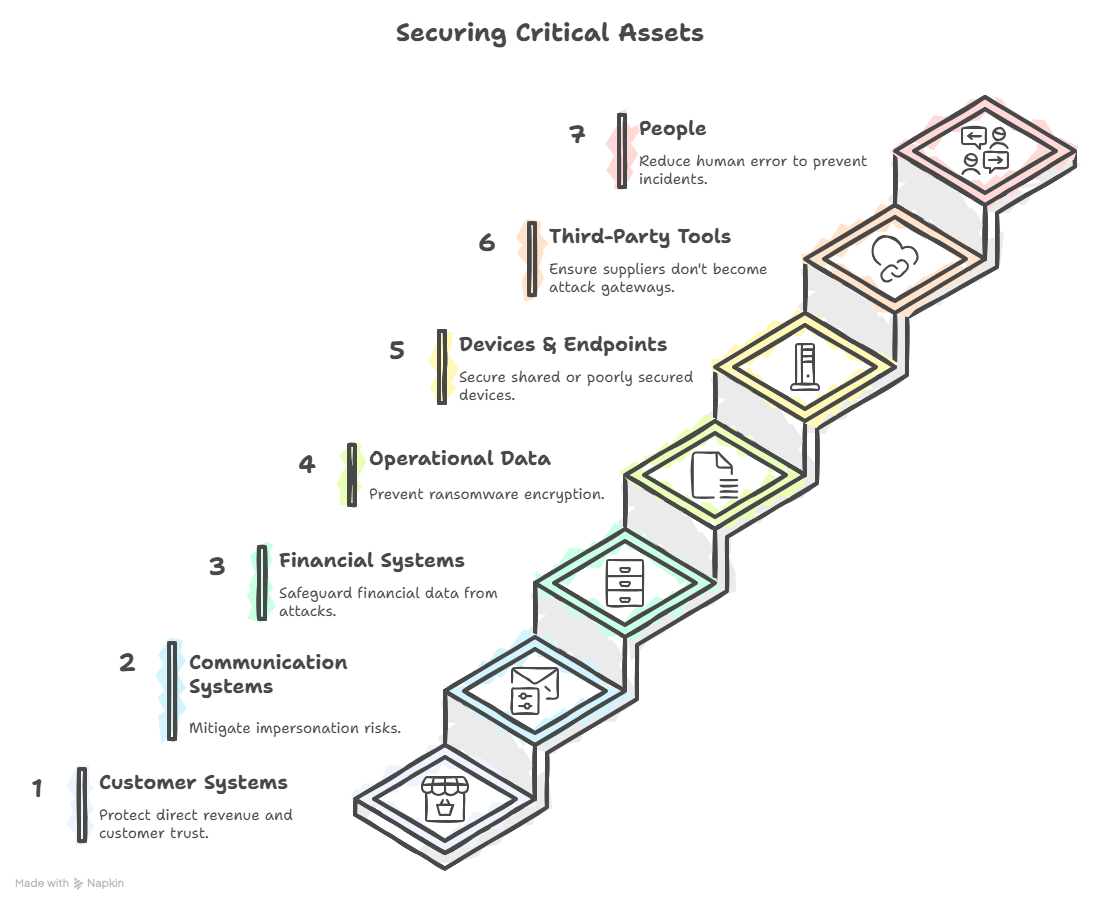
Your critical assets fall into seven practical categories:

  • Website
  • Booking system
  • E-commerce store
  • CRM - Why it matters: direct revenue + customer trust.
  • Email accounts (your biggest attack surface)
  • WhatsApp Business, Teams, Slack
  • Why it matters: impersonation risk.
  • Payroll and accounting tools
  • Online banking access
  • Supplier portals - Why it matters: attackers target financial staff first.
  • Spreadsheets
  • Order files
  • Project folders
  • Designs, contracts, proposals - Why it matters: this is what ransomware encrypts.
  • Laptops
  • Mobile phones
  • Tablets
  • POS terminals = Why it matters: devices are often shared or poorly secured.
  • Payment processors
  • SaaS platforms
  • Booking tools
  • Social media - Why it matters: compromised suppliers become attack gateways.
  • Staff
  • Contractors
  • Freelancers
    Why it matters: most incidents begin with human error, not malware.
 

The 6 SME-Targeted Attack Types 

Red flags:

  • sender domain off by one character
  • vague greetings (“Dear user”)
  • urgent deadlines
  • threats (“account will close today”)

Practical example:
A staff member receives an email pretending to be Microsoft 365 telling them their mailbox storage is full. Clicking the link opens a fake login page. Credentials get stolen instantly.

An attacker gains access to a mailbox and impersonates your staff.

High-risk roles:

  • CEO
  • Finance / accounts payable
  • HR
  • Office managers

Real example:
Attacker sits unnoticed in the company mailbox for two weeks → studies invoice patterns → sends a fraudulent bank detail update → finance pays a €14,000 invoice to the wrong account.

Attackers encrypt your files and demand payment.

How it enters SMEs:

  • malicious attachments
  • outdated software
  • remote access tools
  • weak or old Wi-Fi routers

Impact:
Even 48 hours of downtime can damage an SME permanently.

Attackers use stolen passwords to access accounts.

Where they get passwords:

  • previously breached sites
  • password reuse
  • shared passwords
  • spreadsheets with stored credentials

Practical tip:
If you use the same password for your email and a shopping site → attackers already have it.

Attackers target your partners to reach you.

Examples:

  • compromised marketing contractor
  • supplier using weak passwords
  • insecure app connected through API

Implication:

Your security is only as strong as the people you work with.

Not malicious — but damaging.

Examples:

  • forwarding sensitive info to personal email
  • storing data in unapproved cloud apps
  • sending customer files to the wrong address

This is common in SMEs where staff wear many hats.

Early Warning Indicators

Behavioural Red Flags

  • employee reports, “I clicked something weird”
  • sudden password-reset emails they didn’t request
  • emails “sent” by you that you didn’t write

Technical Red Flags

  • antivirus turned off
  • new browser extensions installed without permission
  • device heats up, slows down, or crashes
  • login alerts from unfamiliar devices

Financial Red Flags

  • suppliers requesting bank changes through email only
  • invoices arriving outside normal cycle patterns

Industry-Specific Threat Examples

Retail / Hospitality

  • POS terminal malware
  • fake customer refund requests
  • Wi-Fi hijacking

Services (consulting, law, accounting)

  • data exfiltration via phishing
  • targeted invoice fraud
  • impersonation of partners

Manufacturing / Logistics

  • downtime attacks
  • disruption of scheduling/production
  • compromised IoT devices

Creative / Freelance sectors

  • fake job offers with malicious attachments
  • compromised shared drives


Build Your Risk Map 


Follow these steps:

  1. List your top 10 assets (not 5).
  2. Map threats to each asset.
  3. Score:

    • Likelihood (1–5)
    • Impact (1–5)
  4. Calculate a simple Risk Score: Likelihood × Impact
  5. Sort your list from highest to lowest.
  6. Identify your Top 3 priorities for the next 30 days.

Unit 2 – How AI Can Help Protect Your Business

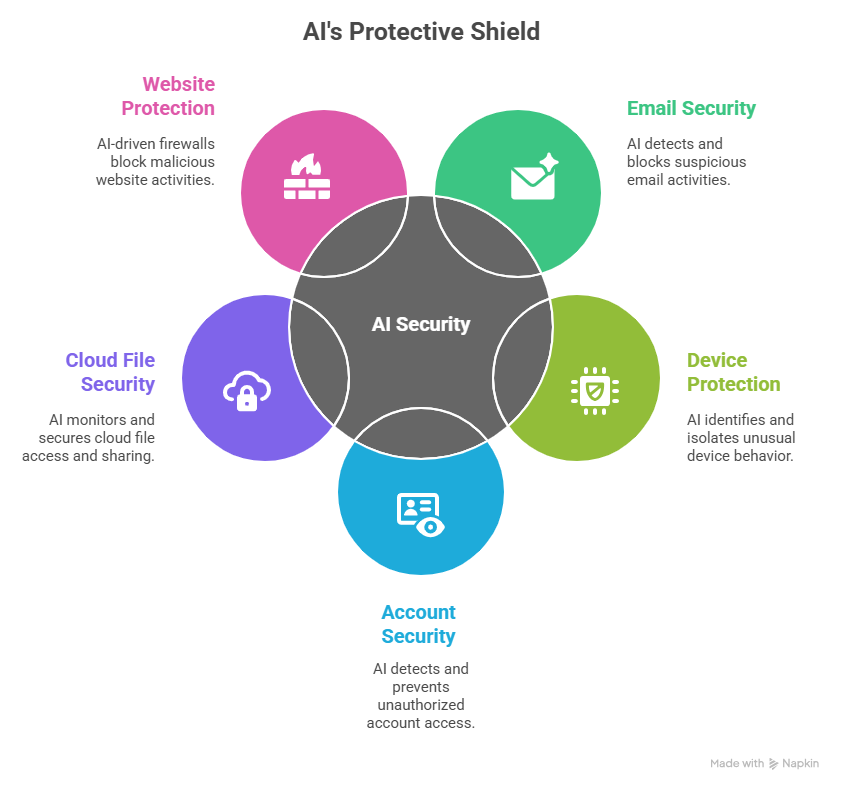
Where AI Actually Protects You

Email Security (Biggest impact)

AI detects:

  • suspicious sender behaviour
  • mismatched domains
  • link manipulation
  • language anomalies (urgency, threats, emotional cues)

Your email provider’s AI blocks the majority of attacks before you ever see them.

Device Protection (EDR/XDR)

AI identifies:

  • unusual login times
  • mass file changes
  • strange software behaviour
  • attempts to disable security tools

Practical example:
An attacker tries to encrypt files → AI notices rapid file modification → device gets isolated automatically.

Account Security

AI detects:

  • impossible travel (Berlin login + 5 minutes later Brazil)
  • login attempts from new devices
  • suspicious IP addresses
  • privilege escalation attempts

Cloud File Security

AI alerts you if:

  • someone downloads huge volumes of files
  • sensitive folders are shared publicly
  • previously unseen devices access your drive

Website & E-Commerce Protection

AI-driven firewalls block:

  • bots scraping your site
  • login brute-force attempts
  • suspicious checkout behaviour

Practical AI Tools SMEs Already Have 


Examples include:

  • Microsoft 365 Defender
  • Google Workspace security centre
  • Dropbox/OneDrive anomaly detection
  • E-commerce platform fraud filters
  • Bank-level AI fraud detection alerts
  • Password manager breach monitoring

You may already be paying for these features without using them.

AI Phishing Analysis 


Step-by-step:

  1. Copy a suspicious message
  2. Remove names, emails, signatures
  3. Paste into your AI assistant
  4. Use the following safe prompt:

“Analyse the text for phishing indicators. Do not open any links. Identify risk level, red flags, and the safest action for an SME.”

Add-on (optional):

Compare the AI analysis to:

  • your red-flag table
  • a colleague’s interpretation

Why this matters:
Different staff notice different details. AI helps level the playing field.

Limitations of AI

  • AI cannot see inside images of documents unless OCR is enabled
  • AI cannot guarantee a link is safe
  • AI sometimes trusts messages written by humans
  • Deepfakes require human verification
  • AI assistants can “hallucinate” safe-sounding explanations

Practical rule:
AI helps you detect, but humans must make the final decision.

Unit 3: Everyday Cyber Hygiene for SME Teams

Everyday Cyber Hygiene for SME Teams 

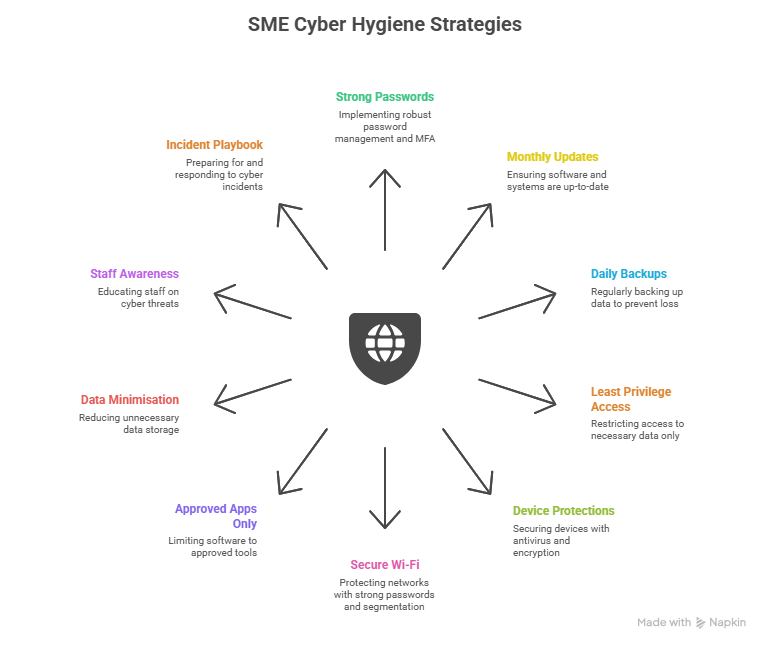
The SME Cyber Hygiene 10 

  • Use a password manager
  • Generate unique passwords for all accounts
  • Enable MFA on email first, then financial accounts
  • Turn on automatic updates
  • Remove unused apps
  • Use cloud backups (OneDrive, Google Drive, Dropbox)
  • Test restoration every quarter
  • Finance does not need access to HR files
  • Marketing does not need access to accounting systems
  • Install antivirus/anti-malware
  • Turn on disk encryption (FileVault / BitLocker)
  • Change default router password
  • Separate “guest” network from “staff” network
  • Maintain a simple list of allowed tools
  • Remove tools no one uses
  • Stop storing unnecessary personal data
  • Archive or delete old customer info
  • Monthly 5-minute reminders
  • “Screenshot this red-flag table” exercise
  • Who to call
  • What to do first
  • How to record actions


Incident Response Plan 

FIRST 5 MINUTES MATTER MOST.

Do this immediately:

  1. Disconnect device from Wi-Fi
  2. Don’t shut down (preserves evidence)
  3. Inform manager
  4. Change relevant passwords
  5. Check for unusual behaviour in cloud tools
  6. Document what happened (time, action, what you clicked)

Role-Specific Responsibilities

  • Approve MFA
  • Approve password manager
  • Lead incident communication

Finance Staff

  • Verify bank detail changes by phone
  • Cross-check unusual invoices

Admin / Office Manager

  • Monitor shared inboxes
  • Maintain app access list

All Staff

  • Report suspicious messages
  • Use password manager
  • Keep devices updated

Unit 4: Additional Resources

ENISA – SME Cybersecurity Toolkit

Clear, practical guides for small businesses, including threat overviews, checklists, and incident response basics.

https://www.enisa.europa.eu/topics/state-of-cybersecurity-in-the-eu/national-cybersecurity-strategies-0/national-cybersecurity

NIST Cybersecurity Framework (Beginner Overview)

A simple, structured way for SMEs to understand and improve their security posture using globally recognised categories. https://www.wiz.io/academy/nist-cybersecurity-framework-csf

UK National Cyber Security Centre – Small Business Guide

Non-technical, highly practical steps SMEs can implement immediately across passwords, devices, and phishing protection. https://www.ncsc.gov.uk/collection/small-business-guide

Google Workspace – Security Checklist for Small Businesses

Security measures to help protect your business information.

 https://support.google.com/a/answer/9211704?hl=en

Cybersecurity Readiness Checklist

Instructions:
Tick ✓ if the practice is already in place. Add brief notes if action is required.

Cybersecurity Practice

In Place? (✓)

Notes

Strong, unique passwords for all business accounts

☐


Multi-factor authentication (MFA) enabled on email and key apps

☐


Devices and software set to auto-update

☐


Daily cloud or local backups are running

☐


Antivirus/anti-malware installed on all devices

☐


AI-based phishing protection active (Google/Microsoft)

☐


Login/security alerts enabled for all staff accounts

☐


Staff trained to identify phishing and social engineering

☐


Sensitive data stored only in approved locations

☐


Incident response steps known by the team

☐


Funded by the European Union. Views and opinions expressed are however those of the author(s) only and do not necessarily reflect those of the European Union or the European Education and Culture Executive Agency (EACEA). Neither the European Union nor EACEA can be held responsible for them. [Project number: 2024-1-AT01-KA220-VET-000245796]

Scroll to Top