
Module 2 - AI Applications in Business

Introduction:

AI isn’t just for tech companies anymore. It’s a working tool for saving time, reducing routine workload, and improving customer engagement.

This module shows how small businesses can apply AI in three main areas:

  • automating repetitive admin tasks,
  • creating marketing content quickly,
  • and applying AI smartly across sectors.

You’ll learn how AI supports everyday business tasks through clear explanations, short practical activities, and a scenario-based assessment. The module focuses on helping SME staff understand where AI adds value in their daily work and how simple AI assistants can support marketing, communication, and productivity tasks.

Learning outcomes

By the end of this module, learners should be able to:

  • Identify key areas in a business where AI can automate routine and repetitive tasks.
  • Explain how AI supports digital marketing and customer communication.
  • Recognise cross-sector AI capability patterns and understand how they apply across different business contexts.
  • Apply simple AI tools or assistants to basic marketing or business tasks.

Units in this Module

Unit 1: Automation & Productivity Tools
Unit 2: Digital Marketing with AI
Unit 3: Turning AI Use Cases into Practical Actions

Unit 1: AI Applications in Business

Introduction:

Think about the jobs that drain your time each week — sorting emails, replying to simple queries, turning notes into documents. These are perfect AI targets.

In this unit, you’ll explore AI tools that act as digital assistants: drafting, summarising, and organising your information.

Why Automation Matters for SMEs

SMEs often operate with too many tasks and too few people. Studies on AI in SMEs show that the main reasons small firms adopt AI are:

  • Saving time and labour costs through automation of repetitive work.

  • Reducing errors in tasks like data entry, invoicing, and reporting.

  • Freeing up staff to focus on value-adding work such as sales, innovation, and customer relationships.

In recent surveys, a majority of SMEs using AI report that the first wins come from simple automation – e.g. automatic invoice processing, email triage, or basic customer support – not from advanced robotics or fully autonomous systems. Survey information here: Link

Key message for learners: Start by targeting boring, repetitive tasks – the ones people complain about – rather than “big, visionary” AI projects.

What Kind of Tasks Can AI Automate?

You can think of automation in three layers:

  1. Information handling – moving, transforming, and organising information.
  2. Communication handling – drafting, responding, or routing messages.
  3. Decision support – suggesting next steps based on patterns in data.

A. Information Handling

AI can support tasks like:

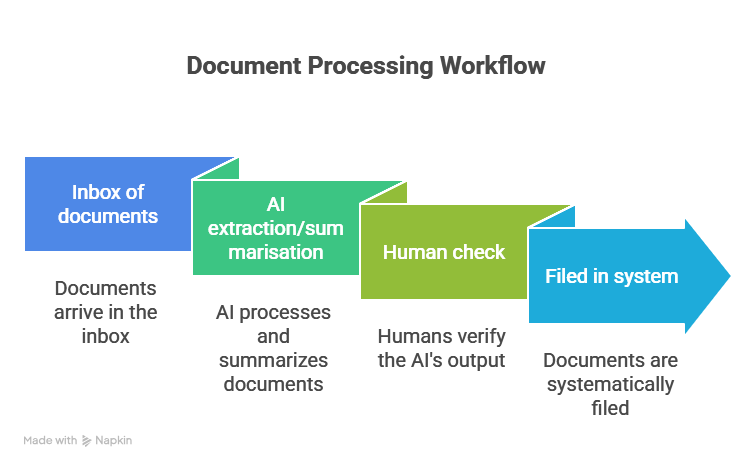
  • Document processing (e.g., Rossum, Docsumo)
    • Reading invoices and extracting key fields (supplier, date, amount, VAT).
    • Scanning contracts and flagging key clauses (deadlines, penalties, renewal terms).
  • Data cleaning and enrichment (e.g.,OpenRefine)
    • Standardising customer names and addresses.
    • Filling in missing values using rules or predictions.
  • Summarisation (e.g.,ChatGPT, Claude)
    • Turning long reports or meeting notes into bullet-point action lists.
    • Producing one-page summaries of multi-page documents.

Research on EU SMEs shows strong interest in using AI for “business support processes” – finance, HR, and admin – where a lot of routine information work happens.

Report can be found here

B. Communication Handling

AI systems (often powered by large language models) are increasingly used to:

  • Draft standardised email replies (e.g. ChatGPT).

  • Categorise incoming messages (complaint, question, sales lead) and route them (e.g., Freshdesk AI).

  • Convert a rough bullet list into a clear internal memo. (e.g.,ChatGPT)

  • Translate messages for cross-border customers or suppliers. (e.g., Deepl Write)

Globally, more than three-quarters of small businesses now use AI tools in at least one function such as customer service or marketing, and email/communication support is one of the most common entry points

C. Decision Support

AI can’t “run the business” alone, but it can:

  • Flag overdue invoices or customers at risk of churning (e.g., QuickBooks AI)

  • Suggest which leads to prioritise based on past conversion data (e.g., HubSpot AI).

  • Predict stockouts and recommend re-order quantities (e.g., Shopify AI Forecasting).

  • Highlight anomalies such as unusual expenses, sudden sales spikes/drops (e.g., Google Looker Studio).

OECD work on AI and SMEs notes that AI’s value often comes from augmenting human decisions – making patterns visible earlier and giving managers better information to act on. Read more here. 

Key distinction for learners:

  • Automation = AI doing the routine work.

  • Decision support = AI helping humans decide, not replacing them.

Where to Look for Automation Opportunities

A simple way for learners to identify automation candidates is to consider three elements:
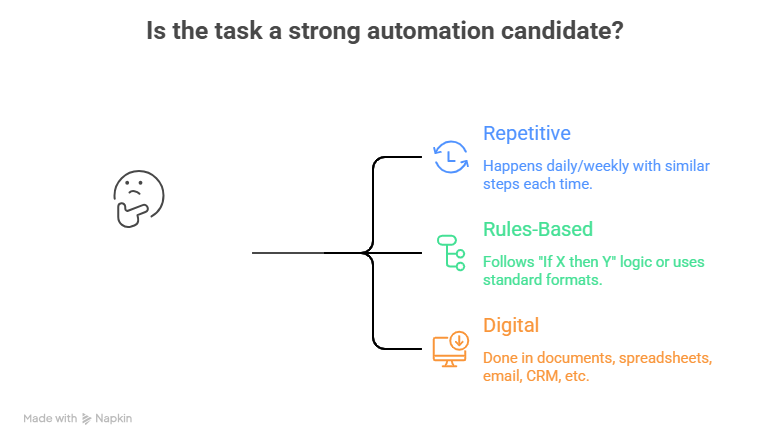
 

If all three apply, the task is a strong automation candidate.

Common SME examples: 

  • Invoicing and expense processing.
  • Appointment scheduling and reminders.
  • Lead capture and initial follow-up emails.
  • Basic HR tasks (holiday requests, standard letters).
  • Report generation (monthly KPIs, sales summaries).

Benefits and Risks (Managers Need Both)

Benefits frequently reported by SMEs: 

  • Time savings and reduced workload on routine tasks.
  • Fewer manual errors (especially in data entry and calculations).
  • Faster response times for customers and suppliers.
  • Better use of staff skills (less admin, more value-creating work).

Risks / challenges learners should be aware of:

  • Poor data quality leading to bad suggestions or errors.
    Over-automation of tasks where personal contact is expected (e.g. sensitive customer issues).
  • Skills gap – staff may not feel confident using the tools.
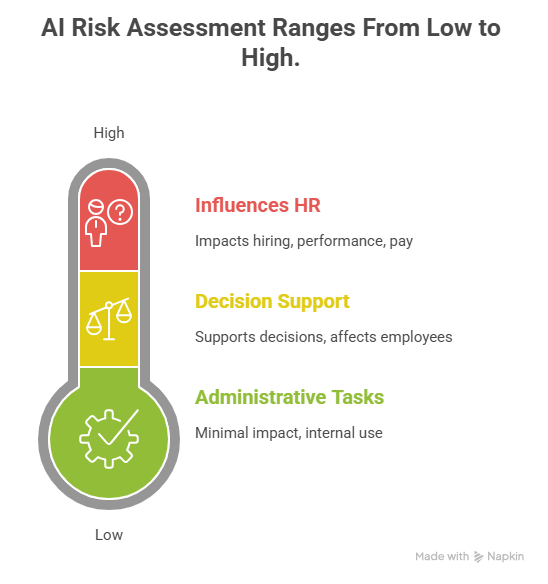
  • Compliance and trust – under the EU AI Act, higher-risk uses of AI (e.g. in HR or credit scoring) will need stricter controls and transparency.
 

Unit 2 – Digital Marketing with AI

Introduction:

Marketing is one of the first functions where SMEs adopt AI because the gains are visible: faster content production, better targeting, and more consistent communication. Surveys from the Marketing AI Institute, HubSpot and others show that:

For SMEs, the key point is: AI helps small teams behave like bigger marketing departments – if it’s used wisely.

Where AI Fits in the Marketing Funnel

AI can support each stage of the classic marketing funnel:

  1. Attract – reach the right people.
  2. Engage – share relevant, compelling content.
  3. Convert – turn interest into sales.
  4. Retain – keep customers coming back.

A. Attract – Research & Targeting

AI can:

  • Analyse website, CRM or social media data to identify which audience segments engage most. 
  • Suggest customer personas based on patterns in behaviour (first-time buyers, loyal repeat buyers, deal-seekers).
  • Help with SEO by suggesting relevant keywords and content ideas.
  1. Engage – Content Creation & Adaptation

This is where generative AI and marketing automation tools shine:

  • Text:
    • Draft blog posts, social media captions, newsletters, and product descriptions.
    • Rewrite content to be shorter, simpler, or tone-adjusted for different audiences.
  • Visuals & Multimedia:
    • Generate image ideas or variants (product visuals, banners).
    • Create video scripts or outlines for explainer videos.
  • Repurposing content:
    • Turn a long blog into social posts and email snippets.
    • Convert webinar transcripts into FAQs or how-to articles.

Research on AI-driven content generation for SMEs highlights that these tools can dramatically reduce content production time but still require human editing for quality, accuracy, and brand fit.

  1. Convert – Personalisation & Optimisation 

AI-powered marketing tools can:

  • Personalise email subject lines and content based on past behaviour.
  • Suggest “next best offer” based on customer history (cross-sell, upsell).
  • Run A/B tests automatically and shift budget toward better-performing ads.
  1. Retain – Customer Communication & Support 

AI chatbots and assistants can:

  • Handle FAQs and simple support questions 24/7 (opening hours, delivery times, returns).
  • Triage customer messages and push complex issues to human staff.
  • Summarise conversations and update CRM records.

For SMEs, this can mean faster responses without hiring full-time staff.

Practical Patterns Managers Can Apply 

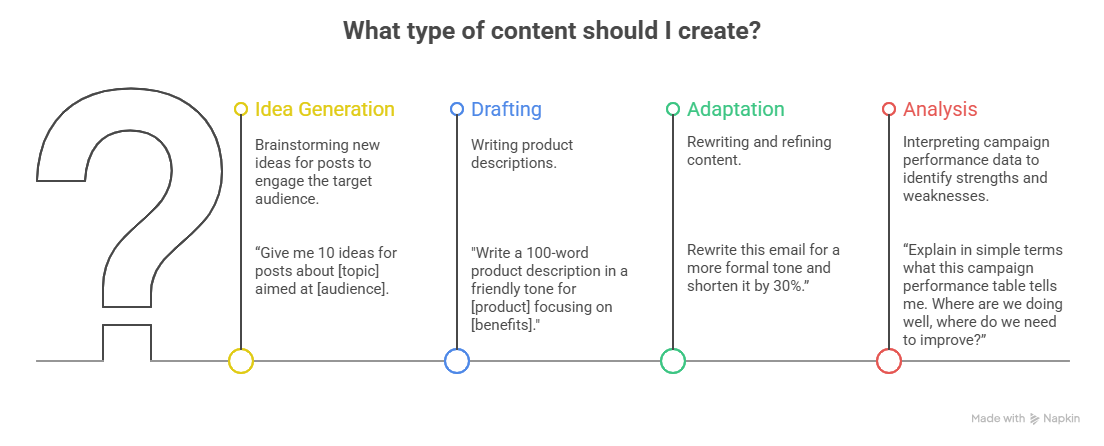
Rather than tying the course to specific brands (which change), focus on patterns of use that managers can map onto whatever tools they have:
 

Risks in AI Marketing 

  1. Brand & quality risk – generic, off-brand, or incorrect content.


  2. Data protection & consent – using customer data for personalisation must respect GDPR and, soon, the EU AI Act.


  3. Trust & transparency – customers may react badly if they discover AI being used in ways that feel deceptive (e.g. fake human chat).

Unit 3: Cross-Sector AI Capability Patterns

Introduction:

Module 1 introduced examples of AI across multiple sectors. But knowing what retail, hospitality, or manufacturing businesses do with AI is only useful if you can translate those ideas into your own context.

This unit moves beyond sector lists and focuses on a more practical question:

“How do I take an AI use case from another industry and adapt it to my business, even if my sector is totally different?”

This approach is called pattern transfer, and it is one of the fastest ways SMEs can identify new opportunities for automation, productivity, and customer value.

AI Capability Patterns

Nearly all AI use cases — regardless of industry — fall into five core capability patterns:

1. Customer Interaction Support

(Chatbots, enquiry handling, booking assistance)
Used in retail, hospitality, education, services.

Transfer pattern:
Any business with customer questions can use this.

2. Content & Communication Generation

(Writing drafts, creating product descriptions, producing visual content)
Used in marketing, creative industries, e-commerce, HR.

Transfer pattern:
Any business that communicates with customers or clients benefits from faster, better content.

3. Process Automation & Documentation

(Standardising tasks, auto-generating reports, summarising meetings)
Used in admin-heavy sectors: HR, finance, legal, consulting.

Transfer pattern:
Any business with repeated steps or heavy paperwork can apply this.

4. Operational Intelligence

(Scheduling, forecasting, route optimisation, resource planning)
Used in logistics, manufacturing, field services.

Transfer pattern:
Any business that plans, schedules, or manages resources gains efficiency here.

5. Data Insight & Decision Support

(Identifying trends, flagging risks, forecasting demand)
Used across finance, retail, operations, accounting.

Transfer pattern:
Any business with data can use AI to find insights and support decisions.

Transfer Exercise: Adapting AI Use Cases to Your Sector 
Step 1 – Identify Your Pain Point 

Choose one challenge from your actual business:

  • Too much admin
  • Too many emails 
  • Poor customer response times
  • Stock issues 
  • Time spent writing content 
  • Unclear data 
  • Slow reporting 
  • Repetitive tasks 
  • Long queues of enquiries 

Step 2 – Match it to an AI Capability Pattern 

Business Pain Point 

Matching AI Pattern 

Overwhelmed with customer questions 

Customer Interaction Support 

Rewriting content repeatedly 

Content & Communication Generation 

Processes done differently by each staff member 

Process Automation 

Difficulty planning labour / stock 

Operational Intelligence 

Too much data, no insights 

Decision Support 

Step 3 – Imagine a Simple 2-Week AI Pilot 

Outline:

  • What would the AI produce? (draft emails, schedule, summarise, etc)
  • Who checks the outputs? 
  • What will success look like? (time saved, errors reduced, faster responses)
  • What risks or limits should you be aware of?

Cross-Sector Scenario Examples 

AI solutions often appear “industry-specific” at first glance — chatbots for hotels, recommendation engines for online shops, route optimisation for delivery companies.
But the underlying AI capabilities are the same, and these capabilities can be transferred into completely different sectors.

Below are short scenarios showing how an AI use case from one industry can be adapted to a very different business context.
As you read through them, focus on the capability pattern, not the sector.

Scenario 1 — Borrowed from Hospitality

Where the idea comes from:
Hotels use AI-powered chatbots to answer booking enquiries, provide availability, and respond instantly to common questions.

How the capability transfers:
A repair or maintenance service can use the same capability — not for hotel bookings, but to automate:

  • appointment requests
  • “What are your rates?” questions
  • service availability
  • basic troubleshooting

Why this works:
Both situations involve high volumes of simple, repetitive customer enquiries that do not always require a human.

Scenario 2 — Borrowed from Retail

Where the idea comes from:
Retailers use AI to analyse and summarise product reviews to understand what customers like, dislike, or frequently mention.

How the capability transfers:
A training provider can apply the same capability to:

  • summarise trainee feedback
  • identify recurring issues
  • extract suggestions
  • detect positive patterns (what learners found useful)

Why this works:
In both cases, the challenge is extracting insight from large amounts of unstructured text.

Scenario 3 — Borrowed from Logistics

Where the idea comes from:
Delivery companies use AI to optimise routes by analysing distance, time windows, traffic patterns, and resource availability.

How the capability transfers:
A childcare centre or small clinic could use the same capability to optimise:

  • staff schedules
  • shift rotations
  • room allocation
  • appointment slots

Why this works:
Both settings require efficient scheduling to avoid bottlenecks, overstaffing, or shortages.

Scenario 4 — Borrowed from Creative Industries

Where the idea comes from:
Design studios use AI tools to create quick visual drafts, colour palettes, layouts, and concept variations before producing final artwork.

How the capability transfers:
A small café or restaurant can use the same capability to create:

  • menu layouts
  • daily specials posters
  • social media images
  • promotional event graphics

Why this works:
Both rely on visual communication — AI simply accelerates the design stage.

Key Takeaway

AI ideas do not belong to one sector.
When you look beyond the industry label and focus instead on the AI capability, you’ll find opportunities everywhere.

  • Think of one AI example you’ve seen in another sector.
  • How could the underlying capability be adapted to your own business?

Unit 4: Additional Resources

  • OECD (2024). Generative AI and Productivity in SMEs.

Overview of how small firms use AI assistants to reduce admin time, automate communication tasks, and support decision-making.

https://www.oecd.org/en/publications/generative-ai-and-the-sme-workforce_2d08b99d-en.html

  • Harvard Business Review (2025). The Gen AI Playbook for Organisations 

Framework for thinking about AI strategically and an offer of practical advice on how to apply gen AI to the tasks of composing jobs.

https://hbr.org/2025/11/the-gen-ai-playbook-for-organizations

  • Microsoft AI Training Resources 

Training resources that introduce popular AI tools 

https://learn.microsoft.com/en-gb/

  • The 2025 State of Marketing AI Report 

This report contains extremely valuable data from over 1000 marketers on AI understanding, usage, and adoption. The report can be downloaded via the link below. 

https://www.marketingaiinstitute.com/2025-state-of-marketing-ai-report

  • Marketing AI Institute – Free Intro Course 

Marketing AI Institute is a private company that makes AI approachable to marketing leaders. They publish articles that help them understand, pilot, and scale AI. They have a free introduction class, where you can take the first step in your AI learning journey. 

https://www.marketingaiinstitute.com/

Assessment Overview

This assessment contains two parts:

  1. Scenario Task – evaluates how you understand and choose the right AI capability/tool for a business need.


  2. Mini Project – evaluates your ability to apply an AI assistant to a simple marketing or business task.

Learners must complete both parts.

PART A — Scenario Task (Knowledge + Application) Scenario:

You work in a small service-based SME that struggles with slow customer response times and inconsistent communication. Staff spend a lot of time rewriting emails, answering repetitive enquiries, and preparing small marketing updates.

Your Task:

Answer the following questions:

  1. Identify two business problems in the scenario that AI could support.


  2. Match each problem to the correct AI capability pattern from Unit 3
    (e.g., “Content & Communication Generation,” “Customer Interaction Support,” “Process Automation,” etc.)


  3. Recommend one AI tool or tool type that could assist with each problem
    (e.g., an AI assistant for writing, a chatbot builder, a translation tool, a summarisation tool — not brand-heavy).


  4. Explain the expected value (e.g., faster responses, consistent tone, reduced admin time).


Purpose:
This tests whether learners can make the connection between a business challenge → an AI capability → an appropriate tool.

PART B — Mini Project (Practical Use of AI Tools)

Please complete ONE of the following tasks using any AI assistant their organisation allows (ChatGPT Free, Claude, Copilot, Gemini, etc.).

Option 1 — Marketing Task: Create a Short Marketing Asset

Using an AI assistant:

  1. Ask the AI to generate three short social media captions promoting a simple product or service relevant to your business. 
  2. Ask for 3 versions – 
  • Version 1: Informative
  • Version 2: Playful
  • Version 3: Call-to-action focused.
  1. Choose your preferred caption.
  2. Edit the text to improve accuracy, tone, or detail.


  3. Submit:


    • The original AI outputs


    • Your edited version


    • 2–3 sentences explaining why you chose and edited that version


Assesses: basic marketing content generation + human editing.

Option 2 – Create an FAQ Response Draft 

Your business receives the same customer enquiry repeatedly.
Using an AI assistant, generate a clear, professional FAQ response that your team could reuse.

  1. Choose one common question from your business context


  2. Paste this prompt into an AI assistant:

    “Write a short, clear FAQ answer to this question: [insert question].
    Keep it friendly and concise. Provide two versions.”


  3. Pick the best version and refine it.


  4. Submit:


    • Your question


    • The AI outputs


    • Your final edited version


    • A short explanation of how this would help your business

Example question for learners who don’t have one:

“How long does delivery take?”

Funded by the European Union. Views and opinions expressed are however those of the author(s) only and do not necessarily reflect those of the European Union or the European Education and Culture Executive Agency (EACEA). Neither the European Union nor EACEA can be held responsible for them. [Project number: 2024-1-AT01-KA220-VET-000245796]

Scroll to Top