
Your goal:
Explore the HubSpot CRM tool, and use its AI feature to generate a personalised email.
- Go to https://www.hubspot.com/products/crm and create a free account.
- In your dashboard, go to “CRM”, and then “Contacts” on the left-hand side. After this, on the right side of this page, click “Add Contacts”, and then “Create new”.
- Enter this fictional profile:
Copy/paste into HubSpot:
- First name: Emma
- Last name: Nolan
- Email: emma.nolan@example.com
- Phone number: 555-0199
- Job title: Interior Design Consultant
- Company: EcoHome Living
- Lifecycle stage: Lead
- Lead status: New
Note:
Lifecycle stage and lead status are core CRM fields that show where a customer is in their relationship with the business. They help teams understand whether someone is a new lead, an active customer, or needs follow-up. Even in a simple training exercise, filling these fields demonstrates how CRMs organise and prioritise customer interactions.
5. Save the contact.
6. Create a note about the contact (shown below), and write this: Visited the shop and asked about eco-friendly candles. Interested in sustainable home products.
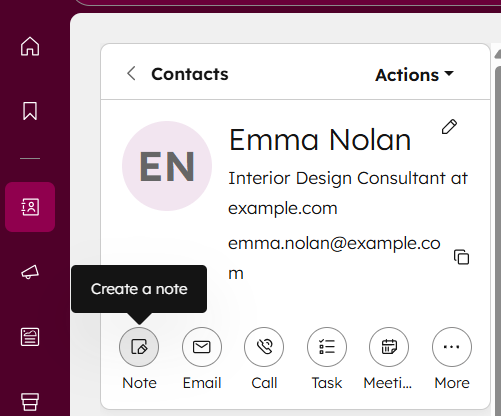
7. Open the contact you created and explore how CRM systems organise customer information.
8. Open HubSpot’s AI assistant, and ask it the following questions:
- “What additional information should I add to this contact?”
- “Suggest three next steps for engaging this customer.”
- “Write a sample CRM note for this contact.”
- “Explain the difference between contacts, companies, and deals.”
This will help you understand CRM structure through AI explanations.
9. Ask the AI:
“Write a friendly, personalised email to Emma Nolan following up on her interest in eco-friendly candles.”
Review and refine the email.
This demonstrates how AI can support CRM communication.
10. To explore the HubSpot’s features in more detail, watch this tutorial video: