Cybersecurity has become a core business responsibility for SMEs, not a technical add-on. Most attacks today target small organisations because they rely heavily on email, cloud tools, mobile devices, and supplier networks—and attackers know these environments are easier to breach. This module provides a highly practical, plain-English guide to protecting your business with the tools you already have. Through real SME scenarios, simple frameworks, and step-by-step actions, you will learn how to identify threats early, use AI-supported protections effectively, and build everyday security habits that significantly reduce risk.
The focus is on what you can implement this month, even without in-house IT staff.
By completing Module 7: Cybersecurity for SMEs, you will be able to:
Attackers prefer SMEs because they offer:
Real SME scenario:
A 10-person accounting practice is targeted through a fake DocuSign email because attackers know it is both busy and handles sensitive data. One employee clicks → their email account is hijacked → attackers send fraudulent invoices to clients.
Key insight:
Attackers don’t guess. They research your website, LinkedIn profiles, opening hours, and customer relationships — then design attacks around real business operations.
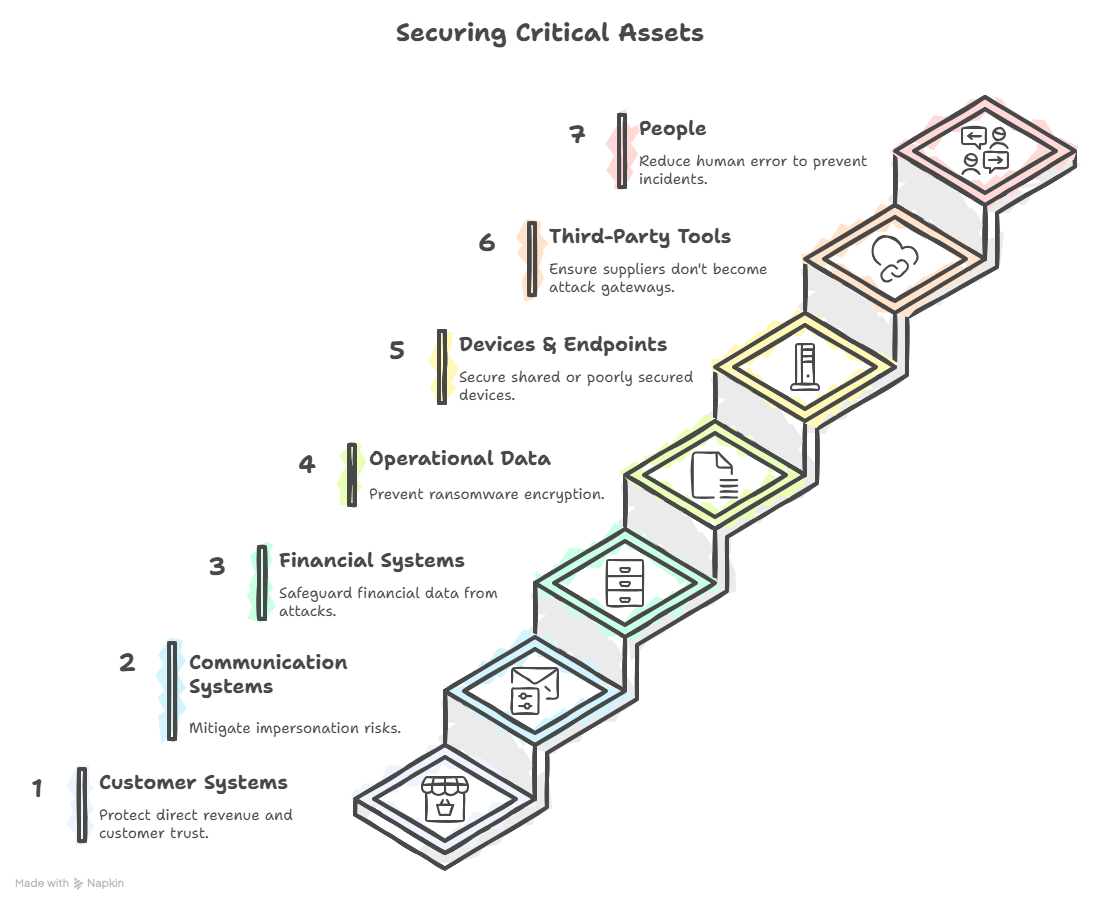
Your critical assets fall into seven practical categories:

Red flags:
Practical example:
A staff member receives an email pretending to be Microsoft 365 telling them their mailbox storage is full. Clicking the link opens a fake login page. Credentials get stolen instantly.
An attacker gains access to a mailbox and impersonates your staff.
High-risk roles:
Real example:
Attacker sits unnoticed in the company mailbox for two weeks → studies invoice patterns → sends a fraudulent bank detail update → finance pays a €14,000 invoice to the wrong account.
Attackers encrypt your files and demand payment.
How it enters SMEs:
Impact:
Even 48 hours of downtime can damage an SME permanently.
Attackers use stolen passwords to access accounts.
Where they get passwords:
Practical tip:
If you use the same password for your email and a shopping site → attackers already have it.
Attackers target your partners to reach you.
Examples:
Implication:
Your security is only as strong as the people you work with.
Not malicious — but damaging.
Examples:
This is common in SMEs where staff wear many hats.
Follow these steps:
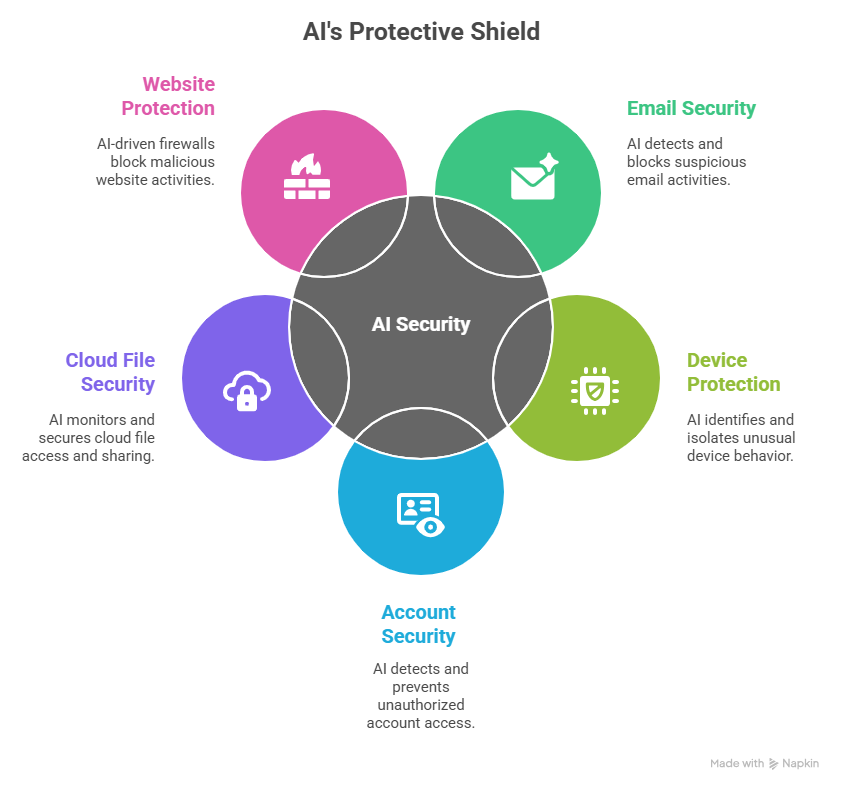
AI detects:
Your email provider’s AI blocks the majority of attacks before you ever see them.
AI identifies:
Practical example:
An attacker tries to encrypt files → AI notices rapid file modification → device gets isolated automatically.
AI detects:
AI alerts you if:
AI-driven firewalls block:
Examples include:
You may already be paying for these features without using them.
“Analyse the text for phishing indicators. Do not open any links. Identify risk level, red flags, and the safest action for an SME.”
Compare the AI analysis to:
Why this matters:
Different staff notice different details. AI helps level the playing field.
Practical rule:
AI helps you detect, but humans must make the final decision.
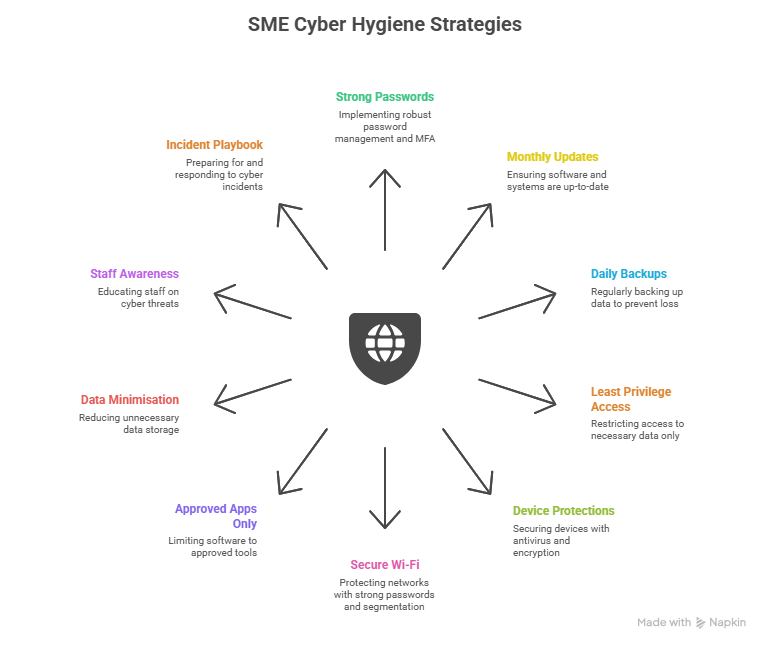
The SME Cyber Hygiene 10

FIRST 5 MINUTES MATTER MOST.
Clear, practical guides for small businesses, including threat overviews, checklists, and incident response basics.
A simple, structured way for SMEs to understand and improve their security posture using globally recognised categories. https://www.wiz.io/academy/nist-cybersecurity-framework-csf
Non-technical, highly practical steps SMEs can implement immediately across passwords, devices, and phishing protection. https://www.ncsc.gov.uk/collection/small-business-guide
Security measures to help protect your business information.
Instructions:
Tick ✓ if the practice is already in place. Add brief notes if action is required.
Cybersecurity Practice | In Place? (✓) | Notes |
Strong, unique passwords for all business accounts | ☐ | |
Multi-factor authentication (MFA) enabled on email and key apps | ☐ | |
Devices and software set to auto-update | ☐ | |
Daily cloud or local backups are running | ☐ | |
Antivirus/anti-malware installed on all devices | ☐ | |
AI-based phishing protection active (Google/Microsoft) | ☐ | |
Login/security alerts enabled for all staff accounts | ☐ | |
Staff trained to identify phishing and social engineering | ☐ | |
Sensitive data stored only in approved locations | ☐ | |
Incident response steps known by the team | ☐ |
Funded by the European Union. Views and opinions expressed are however those of the author(s) only and do not necessarily reflect those of the European Union or the European Education and Culture Executive Agency (EACEA). Neither the European Union nor EACEA can be held responsible for them. [Project number: 2024-1-AT01-KA220-VET-000245796]